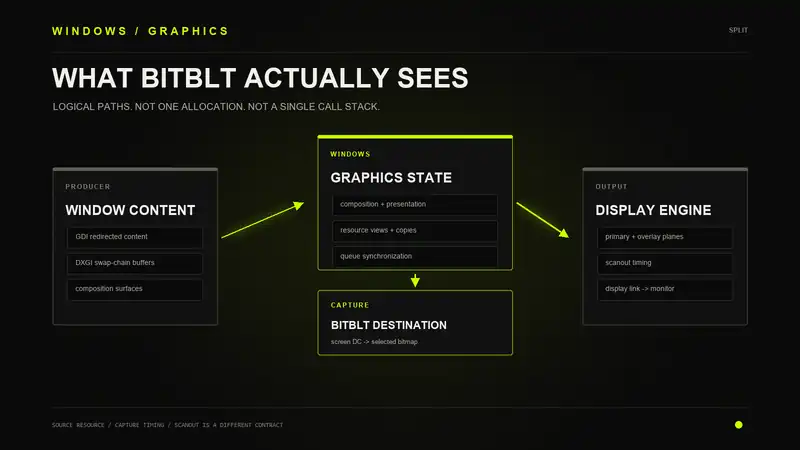
A screenshot looks like a copy of whatever the GPU is sending to the monitor. There must be a finished frame somewhere. Read that buffer, save the pixels, done.
That explanation works until the display hardware is combining several surfaces, or DWM lets an application buffer go straight to scanout. Now the image on the monitor may never have existed as one finished bitmap in memory.
I followed the Windows 10 graphics path in IDA to see where those surfaces go. The question was simple: when BitBlt takes a screenshot, is it reading what the display engine reads? And if something changes late in presentation, does the screenshot see it?
The answer depends on the surface, not how far down the stack the code runs.
Start With the Pixels
An HWND is not a framebuffer. It identifies a window. Windows knows where that window is, what covers it, and which content belongs to it. The pixels live somewhere else.
A GDI application draws through a device context. Under desktop composition, that drawing contributes to off-screen window content rather than painting the physical display directly. Much of the rasterization can happen on the CPU. Some operations and transfers can use acceleration.
A Direct3D application renders into graphics resources. For a window with a swap chain, those include the back buffers. The application fills a buffer and calls Present to submit it for presentation.
DirectComposition adds another piece. Instead of handing over one flattened window image, an application can build a tree of visuals with separate content, transforms, clips, and opacity. DWM can work with those pieces as part of the desktop.
The usual composed path looks like this. It crosses processes and queues, so it is not one continuous call stack.
Application content
    -> DWM composes the desktop
    -> GPU writes the desktop output
    -> Windows schedules presentation
    -> display driver configures scanout
    -> display engine reads the output
    -> monitor
The application drawing its window and DWM drawing the desktop are separate jobs. Both can use the GPU. Finishing the first job does not mean the second one has happened.
What Present Does
Present does not immediately put the back buffer on the monitor. In dxgi.dll, it goes through PresentImpl into PresentImplCore, which handles the different presentation paths.
CDXGISwapChain::Present
    -> PresentImpl
       -> PresentImplCore
The interesting calls inside PresentImplCore are FlipPresentToDWM, PrepareWindowedBltPresent, and PresentFullscreenFlip. These are not three names for the same operation. They lead into different ways of making application content available for display.
With the blt model, the back-buffer contents are copied into a redirection surface. DWM reads that surface when it composes the desktop. With the flip model, the back buffers are shared with DWM, so it can read an eligible application buffer without that extra copy.
Blt model
App buffer -> redirection copy -> DWM

Flip model, with composition
Shared app buffer -> DWM
That is the advantage of flip presentation. One less copy between the application and the compositor. It does not mean the entire route to the monitor is copy-free. DWM may still read that buffer and write a composed desktop image, and moving content between GPUs can add a transfer.
There is also queueing. Windows can wait, discard superseded frames, or report that a window is occluded. A successful Present is not a receipt from the monitor.
How DWM Gets the Changes
DirectComposition separates what a visual contains from where it goes. A visual can refer to a surface or swap chain. A target attaches the root visual to a window, and child visuals describe the pieces underneath it.
Commit submits the changes made to that composition state. Present submits swap-chain content. If a visual already points at the right swap chain, the application can keep presenting new buffers without rebuilding the visual tree every frame.
Inside dcomp.dll, CDevice::Commit calls CommitToKernel. That function dispatches through a channel interface. The KernelChannel::CommitChannel implementation calls NtDCompositionCommitChannel, which crosses into the kernel through win32u.dll.
In win32kbase.sys, NtDCompositionCommitChannel builds and submits a batch through CApplicationChannel. The application has handed off work. DWM picks it up on its own side.
Application
    Commit -> channel -> kernel batch queue

DWM
    get pending batches -> process commands -> update scene
The receiving code is in dwmcore.dll. CKernelTransport::DispatchBatches calls NtDCompositionGetConnectionBatch. Other processing goes through CComposition::ProcessDataOnChannel, ProcessCommandBatch, and ProcessMessage.
The channel does not have to carry every pixel in the window. It can carry commands and references to content that is already shared. Moving a visual and replacing the pixels inside it are different changes.
DWM Draws the Desktop
DWM takes the available content and works out what needs to appear. Window order, clipping, opacity, animations, and effects all matter here. A completely covered window may not need composition work at all.
This is why dragging a window does not inherently require the application to repaint its entire client area. DWM already has content it can place at a new position. The application can redraw when it needs to, but moving the existing image is the compositor's job.
CPartitionVerticalBlankScheduler::ProcessFrame ties several parts together. It calls CComposition::PreRender, checks overlay capabilities through UpdateMPOCaps, and reaches ComputeOverlayConfiguration. Presentation goes through CComposition::Present to CRenderTargetManager::Present.
For a composed frame, DWM submits graphics work that reads the source surfaces and writes the desktop output. That work still has to reach the GPU. DWM does not get a private shortcut around the graphics driver just because it owns the desktop.
Getting Work to the GPU
The graphics runtime and the vendor usermode driver turn rendering work into commands the GPU understands. Windows then has to make sure the resources are available, dependencies are satisfied, and the work gets scheduled.
VidSch handles scheduling and execution progress. VidMm handles memory placement, residency, and GPU address mappings. A resource having an address does not mean it is ready to use. The memory must be available, and earlier work may still own it.
App or DWM rendering work
    -> graphics runtime
    -> vendor usermode driver
    -> kernel submission
    -> scheduling, residency, synchronization
    -> vendor kernel driver
    -> GPU execution
The details depend on the driver model and context. Older physical-address paths can involve command preparation and patching before submission. WDDM 2.x also supports GPU virtual-address submissions, and supported hardware can use hardware queues. There is no single Render -> Patch -> SubmitCommand sequence that describes every Windows 10 submission.
Two exports show where the familiar usermode names lead. gdi32!D3DKMTPresent forwards to win32u!NtGdiDdDDIPresent. D3DKMTSubmitCommand forwards to NtGdiDdDDISubmitCommand. Despite the DLL name, this is not ordinary GDI drawing.
In the graphics kernel, DxgkSubmitCommand goes through DxgkSubmitCommandInternal to DXGCONTEXT::SubmitCommand. This gets GPU work submitted. Selecting what the monitor scans is a related but separate job.
Where Scanout Starts
The presentation path in dxgkrnl.sys reaches the driver through these functions:
DxgkPresent
    -> DXGCONTEXT::Present
       -> DXGCONTEXT::SubmitPresent
          -> ADAPTER_RENDER::DdiPresent
DxgkDdiPresent can prepare commands that will execute later. The name does not mean it always changes the display address right there. There are also MMIO flips that do not need a GPU DMA buffer for the flip itself.
The more useful name for the display side is DxgkDdiSetVidPnSourceAddress. Its arguments identify a display source and the primary allocation or address to use. This is Windows asking the driver to configure what the display hardware reads.
VidSchSetVidPnSourceAddress in dxgmms2.sys reaches an ADAPTER_DISPLAY wrapper and the graphics-core interface. The wrapper in dxgkrnl.sys calls a registered driver function pointer. Beyond that point, AMD or NVIDIA implements the hardware-specific work. I did not trace their firmware or register programming.
The display engine reads the selected surfaces according to display timing and sends the result over HDMI or DisplayPort. The monitor then does its own processing. Completing GPU commands, switching the displayed surface, and finishing the monitor's pixel response are not the same event.
The Desktop Is Not Always Flattened
Ordinary composition produces a desktop output buffer. That is the easy case to picture. DWM reads application content, blends it, and presents the result.
Independent flip changes that. When the window and hardware allow it, an application buffer can be used for scanout without DWM rendering a full desktop image for every application frame. DWM still manages the transition and can return to composition when the desktop changes.
Multiplane overlays add another possibility. The display hardware reads several surfaces and combines them during display. The application content, desktop content, and cursor do not necessarily start in the same allocation.
| Path | What the Display Uses |
|---|---|
| Composed desktop | DWM's rendered output |
| Independent flip | An eligible application buffer |
| Multiplane overlay | Several surfaces combined by display hardware |
That is where the "just read the final framebuffer" explanation breaks. The display can assemble an image that never existed as one finished bitmap in memory.
The rendering GPU can also differ from the GPU connected to the monitor. Content may need to cross between adapters. A virtual or remote display adds its own path. These are reasons to follow the actual resources rather than assume every machine has the same chain.
What BitBlt Copies
BitBlt reads from the source device context passed as hdcSrc. With SRCCOPY, it copies a rectangle from that source into the destination. What it reads depends on which DC the caller supplied.
| Source | Pixels Represented by the DC |
|---|---|
| Memory DC | The bitmap selected into it |
| Window DC | The drawable window area represented by that DC |
Screen DC, such as GetDC(NULL) | The desktop image Windows exposes through GDI |
The normal screenshot pattern is a screen DC as the source and a bitmap selected into a memory DC as the destination. The result is a bitmap the application can read or save.
Screen DC
    -> BitBlt with SRCCOPY
       -> destination bitmap
The DC is not a pointer to the current scanout allocation. GDI resolves the surface and the transfer behind it. A window DC is not a shortcut to the application's swap-chain back buffer either.
gdi32full!BitBlt calls NtGdiBitBlt. In win32kfull.sys, that reaches NtGdiBitBltInternal. I stopped short of resolving which backing allocation the screen-DC branch reads. So I cannot call it DWM's front buffer or the live scanout buffer. That part needs a deeper trace.
CAPTUREBLT does not settle it. The flag requests inclusion of layered windows. It does not ask the driver to read every hardware plane or capture the exact scanline being sent down the cable.
Would a Late Change Show Up?
Suppose something changes just before the vendor kernel driver. Would BitBlt see it?
"Just before the driver" is not enough information. That part of the stack handles command submissions, synchronization, and display configuration. It is not a paint layer that every screenshot must pass through.
If capture reads the changed surface after the write becomes visible, the pixels can appear. If capture already copied the old contents, that screenshot is already made. If presentation uses a different surface, the answer depends on whether Windows includes it in the image supplied to capture.
Timing and resource identity decide it. Moving further down the software stack does not answer either question.
The same problem applies to claims about overlays. Hardware composition does not automatically make content invisible to screenshots. Windows can provide capture with another representation, and different capture APIs do not have to read the same image in the same way.
Desktop Duplication Is Not the Cable
DXGI Desktop Duplication makes the capture side more explicit. IDXGIOutputDuplication::AcquireNextFrame returns a desktop-image surface with update information. The application can process that surface on the GPU or copy it for CPU access.
It still is a capture image, not a tap on the display signal. Microsoft documents a useful example: the mouse pointer may already be drawn into the image, or it may be supplied separately. If it is separate, the capture client has to draw it.
Even there, "the desktop image" can need another step before it looks like what the user sees. A render fence or a completed capture call says nothing about the monitor's own processing.
GDI capture, Desktop Duplication, and Windows Graphics Capture have different interfaces and behavior. Testing one does not establish what all three will return.
Further Reading
- DirectComposition Architecture and Components
- DXGI Flip Model
- DirectFlip and Independent Flip
- Comparing Direct2D and GDI
- GPU Virtual Memory in WDDM 2.0
- D3DKMTSubmitCommand
- DxgkDdiPresent
- DxgkDdiSetVidPnSourceAddress
- Multiplane Overlay Support
- BitBlt
- Desktop Duplication API
Follow the Surface
To work out what a screenshot sees, find the resource being read, the copies made from it, and the point where capture reads those copies. Then compare that with the surfaces selected for presentation.
A function being close to the display driver tells you where the code runs. It does not tell you where the screenshot gets its pixels.