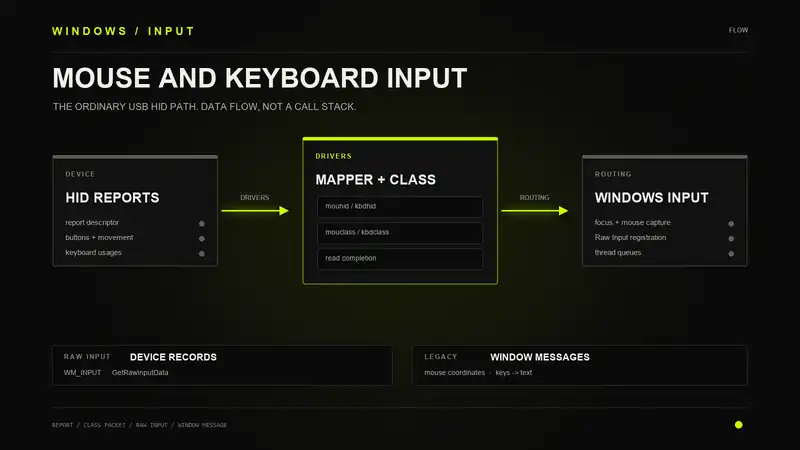
A mouse moves, the cursor moves, and an application receives WM_INPUT. It is tempting to treat those as three views of one packet. They are not. Windows has already parsed a report, completed a class-driver read, processed device state, and made delivery decisions.
There is more going on. A USB report is not a mouse class packet. A scan code is not a character. WM_INPUT is not the report that came off the cable, and the handle inside it is not proof that a person moved a physical device.
I inspected the driver path and followed the win32k side in IDA. The private routines below come from x64 win32kbase.sys and win32kfull.sys, both file version 10.0.19041.5737. The supporting evidence identifies the binaries and analysis locations. These are static findings from selected routines and dispatch tables, not a live trace from a physical device to a window. The public API and text-composition sections describe documented contracts.
The Device Describes the Data
A HID mouse does not send an HWND, a window message, or a Windows cursor position. It sends reports whose layout is described by its report descriptor. The descriptor identifies controls, field sizes, ranges, and whether values are relative or absolute.
That matters before the first movement event arrives. Windows needs to know which bits describe buttons, which values describe motion, and how to interpret them. Treating every mouse report as the same fixed byte layout would work for some devices and fail on others.
HID also separates a physical device from the functions it exposes. One receiver or composite device can expose mouse, keyboard, consumer-control, and vendor-specific collections. HIDCLASS creates a device object for each top-level collection.
A device list can contain several entries for what looks like one object on the desk. That is not necessarily duplicate enumeration. Windows is exposing separate functions.
For an ordinary USB HID mouse and keyboard, this is a simplified data-flow diagram. It omits optional filters and does not represent one continuous call stack:
Physical mouse motion, button change, or key change
    |
    v
Sensor or switch -> device firmware -> HID input report
    |
    v
USB interrupt-IN transfer and host-controller stack
    |
    v
hidusb.sys + hidclass.sys -> matching input collection
    |
    +-- mouse -> mouhid.sys -> mouclass.sys
    |
    +-- keyboard -> kbdhid.sys -> kbdclass.sys

Both class paths
    |
    v
RIM: asynchronous device reads and completed buffers
    |
    v
win32k sensors and mouse/keyboard processors
    |
    v
State updates and delivery policy
    |
    +-- registered Raw Input
    |      -> application reads mouse/keyboard records
    |      -> application interprets those records
    |
    +-- legacy window-message delivery
           -> application retrieves messages
           -> key-to-text translation where applicable
           -> application dispatches messages
           -> window procedure or control handles input
The reports, class packets, and application records are software representations of input. Becoming a software record does not make a physical event synthetic. If "virtual input" means software-generated input, that is a separate producer, shown in the SendInput graph below.
The parser in hidparse.sys is used to understand the reports. It is not another queue that every packet passes through. The mapper drivers call it when they need capabilities, usage values, and changes in button or key state.
The Read Was Already Waiting
USB input is asynchronous. The driver can submit a read before the device has new data. When the transfer completes, completion code runs and the report moves up the stack.
The term "interrupt endpoint" causes confusion here. USB interrupt transfers are serviced on a schedule by the host controller. It does not mean the application is spinning in a loop reading the mouse, or that the device directly calls a Windows function whenever it moves.
In hidusb.sys, HumReadCompletion handles the transport completion. In hidclass.sys, HidpInterruptReadComplete identifies reports and reaches HidpDistributeInterruptReport. The completion path can also submit another read through HidpSubmitInterruptRead.
Read submitted
    -> transfer completes
       -> identify report and collection
          -> distribute report
             -> keep the read path running
HidpProcessInterruptReport shows both sides of the waiting problem. If a read is waiting, it can copy the report into that request. If there is no waiting read, it can queue the report for later consumption.
There are already queues here, well before any thread receives WM_INPUT. A pending device read and a pending window message are different work owned by different parts of Windows.
How a Mouse Report Changes
mouhid.sys maps HID mouse reports into the form expected by the mouse class driver. Its read completion is where the parser calls become useful.
The inspected MouHid_ReadComplete contains calls to HidP_GetUsages, HidP_UsageListDifference, HidP_GetScaledUsageValue, and HidP_GetUsageValue. These parser APIs extract active usages, compare usage lists, and retrieve values from a report. They are part of the mapper's work, not evidence that every report takes every branch.
Buttons are a good example. A report can describe which buttons are held now. The consumer often needs to know which button just changed. Comparing the current and previous usage lists gives the mapper the information needed to distinguish a new press from a button that stayed down.
Movement needs its own interpretation. A relative value describes displacement. An absolute value describes a position in the device's coordinate range. Signed ranges and descriptor information matter. The same bytes do not mean the same movement without that context.
The result is mouse class data, described by MOUSE_INPUT_DATA. It carries motion and button information in a Windows format. It is no longer just the original device report.
HID mouse report
    -> extract controls and values
    -> compare button state
    -> mouse class data
The read machinery matters too. MouHid_StartRead prepares a read and associates it with MouHid_ReadComplete. It tracks whether reading can continue and coordinates with device removal. The happy path is not the whole driver. A mouse can disappear while work is outstanding.
A Keyboard Report Is Not Text
kbdhid.sys has a similar job, but the output is keyboard data rather than mouse movement. The inspected KbdHid_ReadComplete contains calls to HidP_GetUsagesEx, HidP_UsageAndPageListDifference, and HidP_TranslateUsageAndPagesToI8042ScanCodes.
That last name is worth stopping on. A USB keyboard can end up represented by scan codes associated with the older keyboard model. Seeing an I8042-style scan code in an application does not mean the key arrived through a PS/2 controller. The HID mapper translated it.
As with mouse buttons, state matters. Reports describe active usages. The mapper works out which usages appeared and which disappeared so the upper layers can distinguish presses and releases.
HID keyboard usages
    -> compare previous and current state
    -> translate usage changes to scan codes
    -> keyboard class data
KEYBOARD_INPUT_DATA describes the key event. It does not contain the finished text a user is typing. Keyboard layout, modifier state, dead keys, and input methods have not all done their work yet.
This is why treating a scan code as a character fails immediately outside a narrow test. The same physical key can have different meanings under different layouts. Shift can change the resulting character without changing which physical key was pressed.
The Class Drivers Have Their Own Queue
mouclass.sys and kbdclass.sys sit above the HID mappers. They provide the mouse and keyboard class interfaces and deliver class data through reads. They do not decide which edit control receives a character.
The two read paths have nearly identical names:
MouseClassRead
    -> MouseClassHandleRead
       -> MouseClassReadCopyData

KeyboardClassRead
    -> KeyboardClassHandleRead
       -> KeyboardClassReadCopyData
The read handlers check the request and device state before passing work along. Data can already be buffered, or a read can wait for input. Completion and cancellation have to agree on who still owns the request.
This is ordinary driver I/O, not the application's message loop. The system consumes mouse and keyboard input above these class interfaces, then applies the routing and delivery rules that applications know as Windows input.
The class drivers also explain why the HID and PS/2 paths can meet. They provide a common interface above different ways of getting the device data into Windows.
PS/2 Takes a Different Entrance
i8042prt.sys handles the legacy keyboard and mouse controller path. It does not need a USB HID report descriptor to decode bytes from that controller.
The binary contains I8042KeyboardInterruptService and I8042MouseInterruptService. Their paths include reading controller data and queuing deferred work. The keyboard routine reaches I8xQueueCurrentKeyboardInput. The mouse routine reaches I8xQueueCurrentMouseInput.
The data still needs to reach the class layer and Windows input processing. The lower half changed. The application did not suddenly acquire a different kind of window procedure.
Bluetooth and HID-over-I2C replace the transport side again. Touch and precision-touchpad handling add other paths. The USB diagram is useful, but it is not a claim that every pointing device on Windows passes through hidusb.sys.
Win32k Owns the Next Read
The class driver does not call a window procedure. In win32kbase.sys, RIMStartDeviceRead calls ZwReadFile with a device file handle, a destination buffer, an I/O status block, and rimInputApc as the completion APC. That is the concrete boundary between the device read and win32k's input machinery.
The APC is not the USB interrupt handler. It runs on the completion side of an asynchronous read. rimInputApc records the completion status, checks manager and device state, and takes the RIM lock before processing a successful buffer. A failed read takes a different branch, with retry and device-state handling instead of treating the buffer as fresh input.
The successful branch calls rimProcessDeviceBufferAndStartRead. That routine distinguishes mouse, keyboard, and other HID input. Its mouse and keyboard branches call rimProcessMouseInput and rimProcessKeyboardInput. It also has explicit pause and resume handling when a completed buffer cannot be handed to the consumer yet.
Selected static read path in win32kbase.sys

RIMStartDeviceRead
    -> ZwReadFile(..., rimInputApc, ...)

    [asynchronous read completion, not a direct call]

rimInputApc
    -> successful read and eligible device
       -> rimProcessDeviceBufferAndStartRead
          +-- mouse    -> rimProcessMouseInput
          +-- keyboard -> rimProcessKeyboardInput
          +-- HID      -> rimProcessHidInput

Consumer unavailable: separate pause/resume branch
There are two reads to keep separate here. RIMStartDeviceRead submits I/O to the device. RIMReadInput supplies the input manager with a consumer buffer and completion event, issues eligible device reads, and checks completed work through rimCompleteReads. Neither function is the application's GetRawInputData.
The Sensor Receives a Batch
CBaseInput::Read gets its dispatcher handle and calls RIMReadInput. On the other side, CBaseInput::OnDispatcherObjectSignaled uses a handler table. The read-notification entry points to CBaseInput::OnReadNotification. This is an event-driven consumer, not a loop repeatedly asking a mouse whether it moved.
OnReadNotification checks the stored completion status. On the successful, non-suppressed path it invokes the sensor's virtual input-processing method, passing the buffer, input type, byte count, and device identity. The mouse and keyboard vtables resolve that call to CMouseSensor::ProcessInput and CKeyboardSensor::ProcessInput. After processing, the routine calls CBaseInput::Read again.
The byte count matters. CKeyboardProcessor::ProcessInputNoLock computes the end of the completed buffer and walks KEYBOARD_INPUT_DATA records until it reaches that end. The ordinary device branch calls ProcessKeyboardInputWorker for each record. One completion is not necessarily one key transition.
The mouse sensor has another batching point. ProcessInputWithRateLimitingIfEnabled tests whether a batch can join its holding frame. Depending on that result and the copy result, it buffers input or calls FlushMouseReports. The flush passes the accumulated MOUSE_INPUT_DATA records to CMouseProcessor::ProcessInput. This establishes a buffering mechanism, not a measured rate limit or proof that it delayed every mouse on the machine.
RawInputThread in win32kfull.sys creates a LegacyInputDispatcher, registers keyboard and HID sensor dispatcher objects, and runs WaitAndDispatch. It also handles timers and other work. The binary has separate mouse-sensor machinery and input-thread takeover paths. Drawing the entire system as one permanent RIT call stack would hide that division.
The Mouse Has More Than One Result
CMouseProcessor::ProcessInput reaches ProcessMouseInputData, where coordinate processing and queued event delivery separate. The coordinate branch can call GetMouseCoord, then CommitMousePosAndMoveCursor, then QueueMouseEvent. There is also a coalescing branch that skips the separate commit and queue calls for eligible adjacent movement records.
The later consumer is CMouseProcessor::ProcessMouseEvent. It dequeues an internal mouse event, checks access to the foreground queue, and initializes CMouseRawInput. It then walks a static table of predicates and handlers. Resolving that table in IDA shows what the indirect calls actually do:
| Predicate | Handler | Work Selected |
|---|---|---|
CanContainMoveTransition | ComputeAndDeliverMouseMove | Movement processing |
ContainsButtonTransition | ComputeAndDeliverMouseButtons | Button transitions |
ContainsWheelTransition | ComputeAndDeliverMouseWheel | Wheel transitions |
Those are conditional handlers in the inspected table order, not three stages that every mouse event must execute. A record can contain more than movement. The consumer has to inspect the transitions rather than assume that every dequeued object means WM_MOUSEMOVE.
CMouseRawInput::PostRawMouse checks its posting state and prerequisites before calling ApiSetEditionPostRawMouseInputMessage. The edition wrapper uses an indirect dispatch pointer. In win32kfull.sys, EditionPostRawMouseInputMessage contains foreground and registered-sink delivery branches, allocates a Raw Input record, and copies the mouse payload into it. A static wrapper and an implementation are not proof of the dispatch pointer's value in a running session.
The useful result is the separation itself. Cursor state, an internal mouse event, a Raw Input record, and the application's eventual handling are different stages. A cursor update does not mean the receiving thread has run.
Keyboard State Comes First
ProcessKeyboardInputWorker interprets the scan code and the KEY_E0, KEY_E1, and make/break information in the class record. Where configured, it applies scan-code mapping before calling VKFromVSC. A failed mapping can stop that path. There is no unconditional "one class record becomes one window message" rule.
VKFromVSC selects keyboard tables from the foreground thread's layout when available, otherwise the global table. Ordinary scan codes index a table. E0 and E1 codes use separate mappings. Some entries also consult modifier state. The virtual-key value is a lookup result under a layout, not a renamed USB usage.
xxxProcessKeyEvent updates raw key state through UpdateRawKeyState. It also updates the generic modifier state for left/right Shift, Control, and Alt. Its later branches perform locale processing and can reach xxxKeyEventEx. That routine has a low-level-hook decision before the normal continuation through xxxUpdateGlobalsAndSendKeyEvent.
In that continuation, UpdateAsyncKeyState appears before hotkey handling and the call to ApiSetEditionHandleRawInput. The Raw Input result can stop later legacy delivery. Otherwise an eligible path reaches ApiSetEditionHandleAndPostKeyEvent. The code is maintaining state and deciding which consumers should receive work. It is not just formatting a message number.
Selected keyboard continuation in win32kbase.sys
Static calls with conditional exits omitted

ProcessKeyboardInputWorker
    -> VKFromVSC                 [scan code to virtual key]
    -> xxxProcessKeyEvent
       -> UpdateRawKeyState
       -> xxxKeyEventEx
          -> low-level-hook decision
          -> xxxUpdateGlobalsAndSendKeyEvent
             -> UpdateAsyncKeyState
             -> hotkey and accessibility-of-queue checks
             -> ApiSetEditionHandleRawInput
             -> legacy key delivery if still eligible
The full-side keyboard routine, HandleRawInput, calls HasRawInputForegroundTarget and conditionally posts through PostRawKeyboardInputToForeground and PostRawKeyboardInputToSinks. It also computes a processing result from foreground registration and supplemental state. That explains why Raw Input and legacy key delivery cannot be modeled as two unconditional copies of every event.
Windows Decides Who Gets It
Having input data is not the same as knowing where to send it. Windows also has focus, activation, mouse capture, desktops, and Raw Input registrations to consider.
Keyboard messages normally go to the window with keyboard focus. That can be a child control inside the active top-level window. Clicking the title bar and typing into an edit control are not the same routing decision.
Mouse messages normally depend on the pointer location and hit testing. Mouse capture can redirect delivery during operations such as dragging. "Send everything to the foreground HWND" does not describe those rules.
Raw Input is a separate registration-based path. An application asks for collections identified by usage page and usage. The usual mouse and keyboard registrations select Generic Desktop mouse and keyboard collections. That registration is not a request to receive characters from a text box.
Documented application-facing delivery choices
    |
    +-- registered Raw Input
    |      |
    |      +-- per-message consumption
    |      |      -> retrieve WM_INPUT in message loop
    |      |      -> DispatchMessage -> window procedure
    |      |      -> GetRawInputData(HRAWINPUT)
    |      |      -> application processes RAWINPUT
    |      |
    |      +-- buffered consumption
    |             -> GetRawInputBuffer reads queued records
    |             -> corresponding WM_INPUT messages removed
    |             -> application processes returned records
    |
    +-- legacy window messages in a typical Win32 loop
           -> GetMessage retrieves a window message
           -> TranslateMessage, if used
           |      -> may enqueue a separate character message
           |         for a later pass through the loop
           -> DispatchMessage
                  -> window procedure or control
                  -> application handles mouse, key, or text
This diagram describes public consumption choices, not the private execution order between producers. The win32k routines above explain selected read, processing, and routing mechanisms. They do not reconstruct every focus change, hook callback, desktop transition, or text-input service.
Microsoft's message-loop documentation describes the retrieval and dispatch sequence. Dialog handling, accelerators, and application frameworks can consume messages through other paths. The graph shows a common loop, not a requirement that every input event reach an application window procedure in that order.
For foreground WM_INPUT, the documented handler contract also requires DefWindowProc cleanup. The graph summarizes consumption choices, not a complete message-handler implementation.
What WM_INPUT Carries
WM_INPUT tells an application that a Raw Input record is available. Its lParam carries an HRAWINPUT. The application uses that handle with GetRawInputData to retrieve the record.
Inside the returned RAWINPUT, the header identifies the kind of record and its source device. The body contains mouse data, keyboard data, or HID report data, depending on the device type.
| Object | What It Identifies |
|---|---|
HWND | The window receiving a message |
HRAWINPUT | The Raw Input record being retrieved |
RAWINPUTHEADER.hDevice | The source device exposed by Raw Input |
| Device interface path | The device interface name returned by a device query |
Those values are not interchangeable. The event handle does not identify a permanent mouse, and the device handle is not a pointer to an application-owned input buffer. A cast does not change what a handle means.
The individual-record implementation makes that distinction concrete. NtUserGetRawInputData validates the supplied handle, rejects an invalid record type, and selects either the header or the full stored record for RID_HEADER or RID_INPUT. With a null output buffer it reports the required size. With a buffer it checks capacity and copies to user memory.
The inspected native x64 entry requires a 24-byte RAWINPUTHEADER. That is a property of this ABI, not a constant to hard-code into every application. Use the SDK structure size for the caller and follow the separate WOW64 rules for buffered input. A header-size check says nothing about where the original physical event happened.
For mice and keyboards, the returned data is already in Windows' mouse or keyboard representation. Other HID collections can supply report bytes through RAWHID. "Raw Input" names an API. It does not mean every device returns untouched transport bytes.
The registration also controls delivery. RIDEV_INPUTSINK allows the registered target to receive Raw Input while the application is in the background. It does not give that window keyboard focus or make it the owner of the system mouse.
Registration is shared within the process. Windows allows one registered receiving window per Raw Input device class in a process, with the last registration deciding the target. A library that silently registers its own window can interfere with the application's existing input handling.
Raw Motion Is Not Cursor Motion
For a relative mouse, Raw Input reports movement deltas. WM_MOUSEMOVE describes a cursor position in the receiving window's client coordinates. These are different measurements.
The distinction is visible in CMouseProcessor::GetMouseCoord. It tests the absolute-motion flag and selects GetMouseCoordinateAbsolute or GetMouseCoordinateRelative. The relative routine calls ApplyAccelerationToDelta before adding the resulting deltas to the cursor position, with branches that swap axes or change their signs. Device displacement and desktop cursor displacement need not match.
The absolute routine selects either the primary-display rectangle or the virtual-desktop union rectangle. It scales the normalized coordinates to that rectangle and adds the desktop origin for the virtual-desktop case. The raw coordinates are not already window-client pixels. A secondary display to the left of the primary makes that mistake particularly obvious.
Microsoft documents that Raw Input mouse motion is not subject to the mouse speed setting used by the legacy cursor path. That public contract and the separate coordinate-processing routines explain why an application should not expect Raw Input deltas to equal the difference between two cursor positions.
That does not mean the data escaped all processing. The device firmware produced a report, the transport delivered it, and the mapper interpreted it. Raw Input bypasses particular higher-level behavior. It does not erase everything below the API.
Absolute RAWMOUSE records need different handling again. Their motion values describe a normalized position rather than a delta. Comparing those values directly with a relative mouse stream would give meaningless results.
Delivery rates can differ too. Windows can coalesce mouse movement, and several records can accumulate while the application's thread is busy. Counting WM_MOUSEMOVE messages is not a reliable way to count physical device reports.
Buffered Input Consumes the Queue
NtUserGetRawInputBuffer does more than repeat NtUserGetRawInputData. It locks the calling thread's input queue, walks entries looking for WM_INPUT, validates each associated record, and copies records that fit. After a successful copy it frees the stored input data and removes the queue entry. When the scan reaches the end with an output buffer, it clears the Raw Input wake state.
It rounds each output stride up to an eight-byte boundary in this x64 implementation. The next record is not necessarily a fixed sizeof(RAWINPUT) away, especially with variable-sized HID data. The documented traversal interface is NEXTRAWINPUTBLOCK. Hand-written fixed-stride walking is the wrong model.
| Consumer | Selection | Successful Result |
|---|---|---|
GetRawInputData | One HRAWINPUT | Copies that record or its header. Returns a byte count when given an output buffer. |
GetRawInputBuffer | Pending Raw Input in the calling thread's queue | Copies queued records and removes their messages. Returns a record count when given an output buffer. |
This matches the documented buffered-input contract. A handler already holding an HRAWINPUT uses GetRawInputData for that record. Draining other pending input with GetRawInputBuffer is a separate operation. It does not guarantee a second copy of the event the message loop already retrieved.
Keys Still Have to Become Characters
The keyboard has at least three names for the same interaction: a HID usage, a scan code, and a virtual-key code. The text produced by that interaction is another result.
A scan code preserves information about which key was involved. A virtual-key code describes the key in Windows terms. A character depends on the selected layout and the relevant keyboard state.
In a normal Win32 message loop, TranslateMessage can turn key messages into character messages. It does not replace the original message in place. The resulting character message is put into the thread's queue and processed separately.
Key event
    -> scan code and virtual-key information
    -> layout, modifiers, and translation state
    -> character message, where applicable
Dead keys make the difference obvious. A dead key can change translation state without immediately producing the final character. The next key can combine with it. There is no useful one-key-down-equals-one-character rule here.
Input methods can compose text across several interactions. A text editor needs the text-input path, not a hand-written conversion from Raw Input records to letters. A game binding physical keys and an editor accepting text are solving different problems.
Key state has timing attached to it too. GetKeyState changes as the calling thread reads key messages. GetAsyncKeyState exposes current key-down state, subject to its access rules. Asking them at the same moment does not mean they describe the same point in the event stream.
The Device Name Is Not the Device's History
Waiting for a mouse event and looking up its hDevice is a reasonable way to ask which Raw Input device produced that event. GetRawInputDeviceInfo can return its interface name and other information.
It does not discover a permanently designated "active mouse." Another mouse can report a moment later. A receiver can expose multiple collections. A virtual device can also participate in the input system.
A VID and PID describe vendor and product information. They are not a unique serial number for a physical unit, and they are not a signature on each input event. An interface marker such as MI_ describes another part of device naming. It does not prove a human moved that device.
There are legitimate exceptions to simple assumptions about handles too. Microsoft documents that Raw Input from a precision touchpad can have a zero hDevice. "No device handle" is not enough to conclude that an event was fabricated.
Identity Is Not Provenance
The handle validation in NtUserGetRawInputData establishes that the request names a usable input object. It does not replay the device's history. Similarly, a source-device handle identifies the source exposed by the input system, not a signed statement that a physical switch closed.
Keep those questions separate when analyzing a trace. Was a class-driver read completed? Which batch reached a sensor? Was a Raw Input record delivered? Did the application's thread consume it? Evidence at the last step does not independently establish all the earlier steps.
Testing the Right Layer
For application testing, use the interface that matches the behavior being tested. SendInput is a supported way to submit synthetic mouse and keyboard input, with integrity-level restrictions. It is not a way to assert that a particular physical HID device sent a report.
Software-generated input: supported API contract

Application prepares INPUT records
    |
    v
SendInput
    |
    +-- rejected or blocked -> no delivery established
    |
    +-- accepted events enter the mouse/keyboard input stream
           |
           v
       Windows input processing
       [synthetic entry path not traced here]
           |
           v
       Delivery according to Windows input rules
           |
           v
       Receiving application handles resulting input
This branch does not describe a physical USB report entering through hidusb.sys. The SendInput return value counts events inserted into the input stream, not events already consumed by a target application. The graph does not assert that each accepted event produces a particular Raw Input record.
Posting a key or mouse message is narrower again. It delivers a message. It does not replay a USB transaction, the driver's parsing, and every input-state change that normally precedes that message.
A parser test can use recorded, non-sensitive reports and descriptors. A UI test can exercise a control through supported automation. A device test can inspect the real device stack. Mixing the results makes it easy to claim that one layer was tested when only another layer moved.
The same discipline applies to latency. Device sampling, USB service intervals, driver completion, input routing, and application processing all take time. A timestamp taken when a window handles WM_INPUT measures that point in the path. It is not automatically the time the switch closed or the sensor sampled.
Further Reading
- Keyboard and Mouse HID Client Drivers
- HID Top-Level Collections
- Keyboard and Mouse Class Drivers (Archived)
- Interpreting HID Reports
- Obtaining HID Reports
- USB Interrupt Transfers
- MOUSE_INPUT_DATA
- KEYBOARD_INPUT_DATA
- Raw Input Overview
- RegisterRawInputDevices
- WM_INPUT
- GetRawInputBuffer
- RAWINPUTHEADER
- RAWMOUSE
- Keyboard Input Overview
- TranslateMessage
- GetRawInputDeviceInfo
- SendInput
Start Before the Message
The driver stack turns reports into usable input. Windows routes that input and presents it through several APIs. The application decides what to do with the result.
When those layers disagree, a message number is not enough. Follow the report, the translation, and the state that connects them. For an application using Raw Input, the API is an observation point. It is not where the input began.