Most Windows hypervisor writing starts in the same place. Bootloaders, VMX root setup, kernel drivers, or hijacking Hyper-V after it is already running. That makes hypervisors feel like something you only touch before Windows starts or from ring 0 after you already won.
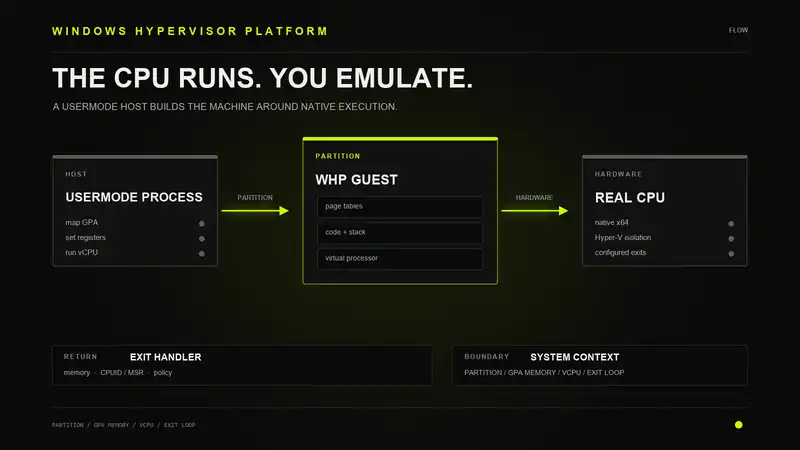
That is not the only model Windows gives you. Windows Hypervisor Platform, usually called WHP or WHPX in nearby tooling, is a usermode API for talking to the Microsoft hypervisor. A normal process can create a partition, map guest physical memory, create a virtual processor, set registers, run code, and receive exits back in usermode.
The interesting part is not that WHP can run a whole virtual machine. QEMU already does that. The interesting part is that the same primitive can be used like an emulator. Load some bytes. Set the machine state. Let the real CPU run until something important happens. Then handle that event yourself.
The CPU does the expensive part. Your code emulates the world around it.
The Part People Miss
When people hear "hypervisor" in Windows research, they usually think about owning the hardware virtualization layer directly. That means enabling VMX or SVM, building VMCS or VMCB state, handling exits in a kernel driver, and living with every weird corner of the CPU manual.
WHP is not that. WHP does not hand your process raw VMX root control. It gives your usermode program an object model exposed through WinHvPlatform.dll. You create handles. You set properties. You map memory. You run a virtual processor. The Windows hypervisor still owns the real virtualization hardware.
That distinction matters. You are not replacing Hyper-V. You are using it. Your process becomes a client of the existing hypervisor.
| Model | Where Your Code Runs | What You Own |
|---|---|---|
| Custom VT-x/SVM hypervisor | Kernel mode or earlier | VMX/SVM setup, controls, exits, scheduling, memory views |
| Hyper-V hijack style | Kernel mode, under Hyper-V | Whatever you can steal or patch from the existing hypervisor path |
| WHP | Usermode | Partition configuration, guest memory, vCPU state, exit handling, device model |
That third row is the one this post is about. Not booting under the OS. Not taking over Hyper-V. Not building a stealth rootkit. Just using the API Windows already exposes and turning it into a hardware-assisted emulator.
What WHP Actually Gives You
The WHP surface is small enough to understand without pretending it is magic. The important objects are partitions, virtual processors, guest physical memory mappings, register sets, and exit contexts.
A partition is the guest container. It is the thing the Windows hypervisor isolates. In a full VM, a partition would contain an operating system. In a tiny emulator, the partition can be much smaller: a few pages of memory, some hand-built page tables, a stack, and a code blob you want to run.
A virtual processor is the guest CPU context inside that partition. It has registers. It has control state. It has a RIP. When you call WHvRunVirtualProcessor, the hypervisor runs that context until something makes it stop.
Guest physical memory is memory from your own process mapped into the guest physical address space. You allocate a buffer with normal Windows APIs, then tell WHP that this host pointer backs some guest physical address range. From the guest point of view, that range is RAM. From your point of view, it is still a buffer you can read and write.
The Basic Shape
A minimal WHP host has a boring lifecycle. Query capability. Create a partition. Configure it. Set it up. Map memory. Create a virtual processor. Set registers. Run. Handle exits. Repeat.
// conceptual WHP lifecycle
WHvGetCapability(...);

WHvCreatePartition(&Partition);
WHvSetPartitionProperty(Partition, WHvPartitionPropertyCodeProcessorCount, ...);
WHvSetPartitionProperty(Partition, WHvPartitionPropertyCodeExtendedVmExits, ...);
WHvSetupPartition(Partition);

WHvMapGpaRange(
    Partition,
    HostMemory,
    GuestPhysicalBase,
    Size,
    WHvMapGpaRangeFlagRead |
    WHvMapGpaRangeFlagWrite |
    WHvMapGpaRangeFlagExecute
);

WHvCreateVirtualProcessor(Partition, 0, 0);
WHvSetVirtualProcessorRegisters(Partition, 0, RegNames, RegCount, RegValues);

for (;;) {
    WHV_RUN_VP_EXIT_CONTEXT Exit = {0};
    WHvRunVirtualProcessor(Partition, 0, &Exit, sizeof(Exit));
    handle_exit(&Exit);
}
That looks like an emulator loop because it is one. The difference is that there is no giant switch over every x86 opcode. You do not wake up for every mov, add, or xor. Those run on the real CPU. You wake up when the guest hits an operation the hypervisor says your process needs to handle.
The exit loop is where the emulator lives.
What Runs in Hardware
Normal instructions run without your code seeing them. If the guest has valid memory, valid state, and no configured trap fires, the CPU just executes. That is why this model is fast compared to a pure software emulator.
Unicorn and QEMU TCG emulate or translate CPU instructions in software. They are useful because they are portable and controllable. They are also doing a lot of work the physical CPU already knows how to do. WHP flips the split. The physical CPU runs the instruction stream under Hyper-V. Your process handles the missing machine around it.
| Layer | Software Emulator | WHP-Backed Emulator |
|---|---|---|
| Instruction execution | Decoded and interpreted or translated in software | Executed by the real CPU inside a Hyper-V partition |
| Memory model | Owned by emulator | Host buffers mapped into guest GPA space |
| Hooks | Instruction callbacks, memory callbacks, translated block hooks | VM exits, page permissions, exceptions, I/O, CPUID, MSR exits |
| Environment | Emulator supplies everything | Your usermode host supplies everything outside the CPU |
The tradeoff is clear. WHP gives you native CPU behavior and speed. It also gives you less per-instruction visibility unless you deliberately create exits.
That is not a weakness by itself. It just changes how you instrument.
Memory Is the Machine
The first serious design decision is memory. WHP maps guest physical addresses, not guest virtual addresses. If your guest runs without paging, this is simple. GPA equals the address your code uses. If your guest expects long mode with paging, you must build page tables and set the control registers to match.
That is where the work starts. A code blob that only needs flat memory can be dropped at 0x1000, pointed to with RIP, and run. A PE image, EFI driver, or Windows driver-like target expects much more. It expects sections. It expects imports. It may expect paging, descriptor tables, exception handling, and OS structures that do not exist unless you synthesize them.
WHP does not create those for you. It gives you the CPU container and memory mappings. The fake machine is your problem.
// conceptual memory layout
#define GPA_CODE       0x00001000
#define GPA_STACK      0x00080000
#define GPA_MMIO_LOG   0x00FF0000
#define GPA_SHADOW     0x01000000

// host allocations
void* CodePage  = VirtualAlloc(NULL, 0x1000, MEM_COMMIT | MEM_RESERVE, PAGE_READWRITE);
void* StackPage = VirtualAlloc(NULL, 0x4000, MEM_COMMIT | MEM_RESERVE, PAGE_READWRITE);
void* MmioPage  = VirtualAlloc(NULL, 0x1000, MEM_COMMIT | MEM_RESERVE, PAGE_READWRITE);

memcpy(CodePage, GuestBytes, GuestSize);

// guest sees these as physical pages
map_gpa(CodePage,  GPA_CODE,  0x1000, READ | EXECUTE);
map_gpa(StackPage, GPA_STACK, 0x4000, READ | WRITE);

// deliberately do not map GPA_MMIO_LOG
// accesses to it become memory exits
That last line is not a mistake. An unmapped page can be a device. If the guest writes to 0x00FF0000, WHP exits to usermode with a memory access context. Your host sees the GPA, the access type, and enough state to decide what to do. That is MMIO by convention. The CPU does not care. Your emulator does.
The Exit Loop
Every useful WHP emulator eventually becomes an exit dispatcher. The guest runs until WHP returns a WHV_RUN_VP_EXIT_CONTEXT. The exit reason tells you what happened.
On x64, the interesting exits include memory access, I/O port access, CPUID, MSR access, exceptions, halt, RDTSC, hypercalls, unsupported features, and cancellation. Some of those are always part of the model. Some only happen if you enable the extended exit controls before setting up the partition.
// conceptual exit dispatch
switch (Exit.ExitReason) {
case WHvRunVpExitReasonMemoryAccess:
    handle_memory_access(&Exit.MemoryAccess);
    break;

case WHvRunVpExitReasonX64Cpuid:
    handle_cpuid(&Exit.CpuidAccess);
    break;

case WHvRunVpExitReasonX64MsrAccess:
    handle_msr(&Exit.MsrAccess);
    break;

case WHvRunVpExitReasonException:
    handle_exception(&Exit.VpException);
    break;

case WHvRunVpExitReasonX64IoPortAccess:
    handle_port_io(&Exit.IoPortAccess);
    break;

case WHvRunVpExitReasonX64Halt:
    GuestRunning = false;
    break;

default:
    dump_exit_context(&Exit);
    GuestRunning = false;
    break;
}
This is where WHP starts to feel like Unicorn from the outside. You can expose a small API around this loop: map memory, set registers, run, hook memory, hook CPUID, hook syscalls, read registers. The difference is under the hood. Your run call enters Hyper-V instead of a software decoder.
Page Permissions as Hooks
The cleanest WHP hook is a page permission. When you map a GPA range, you choose read, write, and execute permissions. If the guest touches a page in a way that is not allowed, WHP exits back to usermode with a memory access exit.
This gives you page-level breakpoints without patching bytes.
| Mapping | What Traps | Use |
|---|---|---|
| Read + Write, no Execute | Instruction fetch | Execution breakpoint on a page |
| Read + Execute, no Write | Writes | Catch unpacking and self-modifying code |
| Execute only | Reads and writes | Split visible bytes from executed bytes |
| Unmapped | Any access | Fake MMIO, guard pages, invalid access logging |
The result is coarse but useful. You do not get byte-granular watchpoints. You get page-granular traps. For a lot of reverse engineering, that is enough. If a VMProtect stub writes into a code page, a write trap tells you exactly which page became interesting. If a shellcode stage jumps into newly unpacked memory, an execute trap catches the transition.
// conceptual execute trap
map_gpa(CodePage, GPA_TARGET, 0x1000, READ | WRITE);

// guest tries to execute GPA_TARGET
// WHP returns WHvRunVpExitReasonMemoryAccess

if (Exit.MemoryAccess.AccessInfo.AccessType == Execute) {
    printf("execute hit at GPA %llx\n", Exit.MemoryAccess.Gpa);

    // allow execution now that we logged it
    remap_gpa(CodePage, GPA_TARGET, 0x1000, READ | WRITE | EXECUTE);
}
This works because the second translation layer is outside the guest. The guest can believe the page is executable in its own page tables. WHP still enforces the GPA mapping permissions under it. The guest sees its normal view. The hypervisor controls the final access.
Split Views Without a Rootkit
EPT split-view hooks usually get discussed in the rootkit context. Read returns clean bytes. Execute runs shadow bytes. That same idea is useful in a usermode emulator, but the intent is different. You are not hiding from the OS. You are building a controlled view for analysis.
One view can be the bytes the guest reads. Another view can be the bytes the CPU executes. With WHP, you can approximate this by switching mappings around memory exits. Map the original page as read/write. Keep a shadow page with instrumented code. When execution hits the target page, remap the GPA to the shadow page with execute permission. When the guest reads the page, remap it back to the original.
// conceptual split-view page
if (is_execute_access(Exit) && Exit.MemoryAccess.Gpa == GPA_TARGET) {
    map_gpa(ShadowPage, GPA_TARGET, 0x1000, EXECUTE);
    resume_guest();
}

if (is_read_access(Exit) && Exit.MemoryAccess.Gpa == GPA_TARGET) {
    map_gpa(OriginalPage, GPA_TARGET, 0x1000, READ);
    resume_guest();
}
This is not free. Remapping pages and forcing exits has cost. TLB state has to be considered. Race conditions matter if you have multiple virtual processors. But for a single-vCPU analysis sandbox, the mechanism is simple enough to reason about.
The useful part is that the guest code does not need an int3. It does not need a guard page visible in its own page tables. It does not need debug registers. The trap lives under the guest physical view.
CPUID Is Your First Fake Device
CPUID is usually the first exit people handle because real code asks about the CPU constantly. Feature flags, vendor strings, hypervisor bits, extended leaves, XSAVE state, cache topology. If you return lazy values, the guest notices quickly.
A WHP emulator can choose what the guest sees. It can pass through the host values. It can mask features. It can lie about virtualization. It can report only the features the synthetic environment is ready to support.
// conceptual CPUID policy
void handle_cpuid(CPUID_EXIT* Cpuid) {
    int regs[4] = {0};
    native_cpuid(Cpuid->Rax, Cpuid->Rcx, regs);

    if (Cpuid->Rax == 1) {
        // hide the hypervisor bit from the guest
        regs[2] &= ~(1u << 31);
    }

    if (Cpuid->Rax == 7 && Cpuid->Rcx == 0) {
        // do not advertise features the emulator cannot model
        regs[1] &= ~AVX512_BITS;
    }

    set_guest_rax(regs[0]);
    set_guest_rbx(regs[1]);
    set_guest_rcx(regs[2]);
    set_guest_rdx(regs[3]);

    advance_guest_rip();
}
The last line matters. For exits caused by instructions like CPUID, the host often has to advance RIP after emulating the instruction. If you forget, the guest runs CPUID again, exits again, and you get an infinite loop that looks like the slowest emulator ever built.
MSRs and RDTSC
MSRs are the second place sloppy emulators fall apart. Guest code reads IA32_EFER, IA32_PAT, IA32_TSC, feature control registers, or vendor-specific ranges. Some reads should succeed. Some should fault. Some should return values consistent with CPUID.
The consistency matters more than any single value. If CPUID says a feature does not exist but the related MSR reads like it does, the environment looks fake. If CPUID says long mode is present but EFER behavior does not match, the environment is broken.
RDTSC is its own problem. If you let it run natively, the guest sees real host time. That may be fine. If you trap it, you can make time deterministic, hide exit cost, or make replay easier. But once you start lying about time, every other clock becomes a consistency problem.
I/O Ports and MMIO
Once a target expects devices, you need a device model. It does not need to be a real chipset. It just needs to answer the accesses the guest actually makes.
I/O port exits are useful for simple channels. A guest can write a byte to a magic port and your host prints it. Old bootloader demos do this with port 0xE9. The same idea works for a tiny WHP guest. It is not elegant, but it is practical.
// conceptual debug port
if (Exit.ExitReason == WHvRunVpExitReasonX64IoPortAccess &&
    Exit.IoPortAccess.PortNumber == 0xE9 &&
    Exit.IoPortAccess.AccessInfo.IsWrite) {
    putchar((char)Exit.IoPortAccess.Rax);
    advance_guest_rip();
}
MMIO is the same idea through memory. Leave a GPA unmapped or map it without the needed access. When the guest touches it, the exit handler treats the address as a device register. Read returns a value. Write updates device state. The device is fake, but the access path is real.
For reverse engineering, fake devices are useful even when the target is not an operating system. A driver-like blob might expect a hardware register. An EFI module might expect firmware services. A packer stub might expect a pointer to a runtime table. You can either build enough of the interface to keep it moving, or deliberately trap and log the access to learn what it wanted.
Running Native Snippets
The easiest target is a flat native snippet. Put code at a GPA. Put a stack somewhere else. Set RIP and RSP. Let it run until it hits hlt, int3, an unmapped access, or a page trap.
; guest payload
mov rax, 0x11111111
mov rbx, 0x22222222
add rax, rbx
mov dx, 0xE9
out dx, al
hlt
The host maps the bytes, initializes state, handles the debug port write, and stops on halt. That is enough to prove the loop works. It is also enough to run small crypto routines, decoder stubs, checksum functions, and fragments extracted from a larger binary.
This is the best way to start. Do not begin with a PE loader, a fake kernel, and a syscall bridge. Start with a dozen instructions and make the exit loop boring. Then add one feature at a time.
Running PE Code
A PE target is where the model becomes more than a fast way to run shellcode. The input is no longer just bytes plus RIP. It is an image with headers, sections, preferred bases, imports, relocations, load config, exception metadata, and expectations about the world around it.
The useful approach is to treat the WHP host as a small loader. Copy headers. Map each section at its virtual address. Zero the difference between raw and virtual size. Apply relocations if the image is not loaded at its preferred base. Preserve section permissions as much as the GPA mapping model allows. Then point RIP at the entry point or at the specific function you want to study.
For a normal usermode PE, the minimum fake world is process-shaped: stack, PEB-like data if the code asks for it, imported APIs, a few memory allocation routines, and a policy for exceptions. For a driver-like PE, the fake world is kernel-shaped: kernel virtual addresses, a driver object, registry path, loaded module list, pool allocation, selected kernel exports, and enough descriptor table and paging state that the code believes it is running in a real long-mode kernel environment.
| PE Expectation | Minimal Emulator Answer |
|---|---|
| Headers and sections | Copy the image layout into guest memory and zero uninitialized section tails |
| Relocations | Apply the base delta before the first instruction runs |
| Imports | Resolve to host-backed handlers, emulated routines, or trap stubs |
| TLS and load config | Run callbacks or initialize only the fields the target depends on |
| Exceptions | Build enough exception state to continue, or stop and use the exception as telemetry |
| Kernel expectations | Synthesize objects, module lists, shared pages, and selected exported routines |
Import stubs are the key trick. Instead of pretending to implement every library or every kernel export up front, give each imported routine a controlled landing pad. When the guest calls it, the call traps back to the host. The host can inspect arguments in guest memory, return a status code, write output buffers, allocate fake objects, or decide that this path is outside the current experiment.
That turns the emulator into a question-answering machine. What does the image import? Which APIs does it actually call? Which buffers does it fill? Which branch does it take when a kernel query returns one shape versus another? You do not need a perfect Windows instance to answer those questions. You need a PE loader, a consistent address model, and enough fake operating system surface to keep the path you care about alive.
The mistake is trying to make everything perfect. Perfect is a full OS. For analysis, the useful target is usually smaller. Keep the fake environment as narrow as the question you are asking, and let unsupported behavior fail loudly so it becomes the next thing to model.
Driver-Like Code
Drivers are where this gets interesting and ugly. A Windows driver expects kernel address ranges, kernel APIs, pool allocation, objects, IRQL rules, Unicode strings, registry APIs, file APIs, device objects, and sometimes real hardware. WHP gives you none of that directly.
That does not make the idea useless. It just means the emulator boundary moves. You can run driver-like code if you synthesize enough kernel surface for the path you care about.
The simplest version is import stubbing. Resolve the driver imports to fake function addresses. When the guest calls one, trap execution at that address and handle it in usermode. Return a value in RAX, write output buffers if needed, advance state, and resume.
// conceptual kernel API bridge
NTSTATUS fake_MmGetSystemRoutineAddress(GUEST_STRING Name, uint64_t* OutAddress) {
    if (guest_string_equals(Name, L"IoCreateDevice")) {
        *OutAddress = GPA_FAKE_IoCreateDevice;
        return STATUS_SUCCESS;
    }

    if (guest_string_equals(Name, L"ZwSetValueKey")) {
        *OutAddress = GPA_FAKE_ZwSetValueKey;
        return STATUS_SUCCESS;
    }

    return STATUS_PROCEDURE_NOT_FOUND;
}
That is not a real kernel. It is a kernel-shaped response for the code path you are exploring. For virtualized or protected drivers, that can be enough. You may not need to boot Windows. You may only need to run the unpacking path, the import resolver, the dispatch handler, or the decryption routine.
EFI and Firmware Blobs
EFI code is another good fit because it already lives in a world of tables and services. A DXE driver expects boot services, runtime services, protocols, handles, and memory descriptors. Those are annoying, but they are also structured. You can synthesize them.
A WHP host can map the image, build fake EFI tables in guest memory, point registers at the entry arguments, and intercept calls into boot services by routing them to fake stubs. For a lot of firmware analysis, you do not need a whole firmware image. You need enough service behavior to get through initialization and into the logic you care about.
The same page-trap model helps here too. Mark protocol tables read-only. Trap writes. Mark code pages execute-only. Trap reads. Leave suspicious MMIO ranges unmapped and log every access. The firmware thinks it is touching hardware. Your process sees the address and the value.
Syscall and API Forwarding
Forwarding guest requests to the host is tempting because it keeps code moving. Guest calls a fake NtCreateFile. The host calls CreateFileW. Guest calls a fake registry routine. The host calls RegOpenKeyExW. It feels easy.
It is also where the sandbox can stop being a sandbox.
A forwarded syscall is a policy decision. What path is allowed? What handle becomes visible to the guest? What happens if the guest asks for \Device\PhysicalMemory, a named pipe, a driver device, or a real registry key? What happens if it creates a thread, maps a section, or asks the host to load a DLL?
Forwarding is useful, but it has to be narrow. Treat every bridge as an attack surface.
| Guest Request | Safer Host Policy |
|---|---|
| Allocate memory | Allocate from an emulator-owned heap and return a guest pointer |
| Read file | Serve from a mounted analysis directory, not the full host filesystem |
| Write registry | Write into an in-memory fake hive, not the real registry |
| DeviceIoControl | Allow only known fake devices with explicit IOCTL handlers |
| Create process | Deny by default |
The boring answer is the right one. Default deny. Add only the calls the target needs. Log every request. Make the fake environment deterministic where possible.
Instruction-Level Visibility
WHP does not naturally give you an instruction callback for every instruction. If you want every instruction, you have to force exits. That usually means using page permissions, exceptions, trap flag behavior, or single-step style tricks. The cost can get bad fast.
For most targets, you do not want every instruction. You want important transitions:
- first execute of a page
- write to a code page
- jump into newly allocated memory
- CPUID and timing checks
- MSR probes
- I/O and MMIO touches
- calls into fake OS APIs
- exceptions
That is where WHP is strong. Let the boring instructions run. Trap the edges where behavior becomes meaningful.
If you need true instruction tracing, this model can still help, but you have to be honest about the cost. A VM exit per instruction is not "near native" anymore. It is a very expensive trace mode. Useful for short windows. Bad as the default.
Why It Works
It works because modern CPUs already contain the hard part of an emulator. They decode x86. They execute the instructions. They handle paging, privilege checks, flags, branches, string operations, SIMD, and the weird corners that software emulators have to model instruction by instruction.
Hardware virtualization lets the hypervisor put a boundary around that execution. The guest runs until it crosses a boundary the host cares about. WHP exposes that boundary to usermode.
The result is an emulator split into two halves:
- The CPU handles the instruction semantics.
- Your process handles the machine semantics.
That split is why WHP is interesting for reverse engineering. A protected stub that abuses obscure x86 behavior is less likely to break because the real CPU is executing it. A full OS environment is still hard because you have to fake a lot of state. Both things are true at the same time.
What To Look Out For
Exit Storms
The fastest WHP emulator is the one that does not exit much. Every exit crosses from guest execution back into the host process. If you make every page execute-trapped and every timing instruction intercepted, you built a slow tracer, not a fast emulator.
Use exits where they answer a question. Remove them when they stop being useful.
RIP Handling
Some exits require you to advance guest RIP. Some do not. If you emulate CPUID, port I/O, or a fake call target, you need to know whether the instruction should be skipped, retried, or redirected.
Getting this wrong creates the classic failure mode: the same exit fires forever. The log looks busy, but the guest is not making progress.
Page Granularity
WHP memory permissions operate at page granularity. If you want to watch one byte, you are still watching the whole page. If unrelated code lives on that page, you will see unrelated exits.
This matters for packed binaries and drivers because code and data can be densely mixed. The page is the unit of control. Design around that.
Multi-vCPU State
Single-vCPU emulation is simple. Multi-vCPU emulation is where page remapping and synthetic devices become annoying. One vCPU can be executing a page while another vCPU reads it. If your hook logic swaps mappings globally, the two views can race.
Start with one virtual processor unless the target truly needs more.
Host Leakage
If the guest can make your host call real APIs with attacker-controlled arguments, the guest is not contained. File paths, registry paths, device paths, handles, named objects, and callbacks all need policy.
This is easy to ignore when the target is your own test blob. It becomes a problem the first time you run something hostile.
CPU Feature Lies
If you mask CPUID features, make sure the related behavior matches. Do not report AVX if your save state does not handle it. Do not report a hypervisor vendor leaf unless you mean to. Do not claim a feature is absent while the matching MSR still behaves as present.
Bad feature modeling creates bugs that look like guest bugs. They are not. They are emulator lies that do not line up.
Where This Fits
WHP is not a replacement for every emulator. If you need deterministic instruction-by-instruction replay across platforms, a software emulator is easier to control. If you need a full Windows VM, use a full VM. If you need to instrument every basic block, DBI may be cleaner.
WHP fits the middle. Native code that should run close to real hardware, but inside a small machine you control from usermode.
Good targets:
- shellcode and native snippets
- unpacking stubs
- virtualized handlers
- crypto routines
- EFI modules
- driver initialization paths
- small kernel API dependent routines with a fake API layer
Bad targets:
- anything that needs a faithful full OS immediately
- heavily threaded code with lots of shared state
- targets that depend on real hardware devices you do not model
- workloads where every instruction must be trapped for a long time
The Practical Version
The practical version of a WHP emulator is not glamorous. It is a loop, a memory map, a pile of exit handlers, and a growing set of lies that are just consistent enough for the target.
That is also why it is useful.
You do not need a bootloader. You do not need to hijack Hyper-V. You do not need a kernel driver just to experiment with hardware-assisted execution. A normal usermode process can ask Windows for a Hyper-V partition and build an emulator around it.
The real CPU runs the code. Your process decides what kind of machine the code thinks it is running on. That is the whole trick.