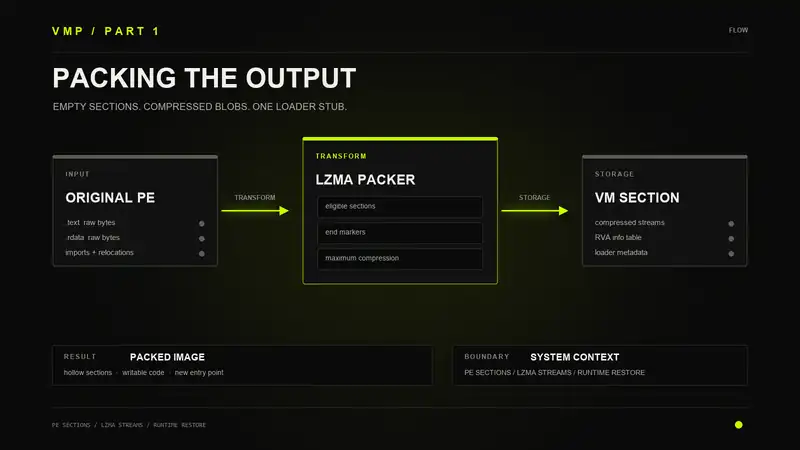
I spent some time on the reversal of VMProtect to understand how it packs executables. When you tick "Pack the output file" in the options panel, it feeds every eligible section through an LZMA encoder at max compression, rips the original section data out of the file, and stuffs the compressed blobs into a new section. At runtime a loader stub fires before anything else and puts it all back.
I want to walk through the compression side first. How it decides what gets packed, how it does the compression, and what the binary looks like after.
Compression Setup
There is an internal wrapper around LZMA that handles all the compression. It creates an encoder handle and sets the parameters: level 9 (max compression), 16 MB dictionary, and end-of-stream markers enabled. That last one matters. Instead of storing decompressed sizes next to each compressed blob, the encoder just writes a termination marker into the stream. The decoder at runtime keeps going until it hits this marker. Saves having to track sizes in the metadata.
I/O goes through a callback model. One adapter reads input from the PE file or from a memory buffer, another collects compressed output. There is a progress callback too that keeps the GUI bar moving.
What Gets Packed
Not every section gets compressed. There are two filters. Sections the user explicitly excluded get skipped. Sections that are both writable and shared also get skipped because those have OS-level semantics that would break.
Everything else with data on disk is eligible. Each selected section gets recorded with its address, size, and a slot for the compressed output. The packer also adds these sections to a writable list because the runtime loader needs write access to decompress directly into the mapped image. A read-only code section would fault if you tried to write decompressed bytes into it.
Relocations
If the binary has relocations and the user did not strip them, there is extra work to do. Any relocation entry pointing into a section that is about to be packed gets pulled out of the main relocation table and saved for the loader. The originals get deleted. After packing, the raw data those relocations reference will not exist in the file anymore, so the loader has to hold onto them and reapply them after decompression.
Compression
One encoder instance handles all sections. Before compressing anything it serializes the LZMA properties into a small header, usually 5 bytes. This encodes the algorithm parameters and gets stored once since every section uses the same settings.
Then it goes through each section. Seeks to the offset, reads the raw bytes, compresses them. The output is raw LZMA with nothing extra around it. No checksums, no length prefixes. Just the stream followed by the end marker.
If resource protection is on, resource data can also be compressed in the same pass. Slightly different path since the data is already in memory, but same compression.
Stripping the Originals
Once everything is compressed, the original section data gets removed from the file. VMProtect truncates the physical size of each packed section, then compacts the file to close the gaps. Physical offsets get recalculated and alignment padding is zeroed. The file shrinks a lot after this.
The sections still show up in the section table with their original virtual sizes. Windows will still map them at the right addresses with the right virtual size. But on disk there is little to no raw data behind them. The actual content is compressed inside the VMProtect section.
The Info Table
The loader needs to know where each compressed blob is and where it should go. VMProtect builds a small table for this. Each entry is a pair of values, a pointer to the compressed data and a pointer to the destination:
struct CompressedChunk {
    uint32_t PackedDataRva;
    uint32_t DestinationRva;
};
The first entry is special. It points to the LZMA properties header and stores its size. The decoder needs those properties before it can decompress anything. Every entry after that is a regular source-to-destination mapping.
The whole table is small. Two DWORDs per section, plus the properties entry. For a binary with a few sections it is maybe 30 to 40 bytes.
The Result
After packing, the PE on disk looks different. The original sections still exist in the section table but most have zero or near-zero raw data. A new section holds the compressed blobs alongside all the other VMProtect data. The name defaults to .vmp with a numeric suffix like .vmp0, .vmp1, etc., but the user can set it to whatever they want, and some configurations randomize it.
The entry point now points to a loader stub in its own section. That stub runs first, decompresses everything, fixes up relocations, rebuilds imports, and jumps to the real entry point.
If you look at the section flags you can tell what was packed. Sections that were originally read-only or execute-only now have the writable flag set because the loader needs write permission to decompress into them.
.text section with the writable flag set and near-zero raw data size. Normal compilers never produce that combination.Why LZMA
LZMA gets better ratios on binary data than most alternatives. Compression is slower, but that only matters at pack time. Nobody cares if it takes an extra second. On the other side, the decoder is fast and the implementation is tiny. The whole LZMA decode routine in the VMProtect runtime has no dependencies. Barely adds anything to the binary, which matters when this runs in every protected executable.
Next
In part 2 I will go through the runtime side. How the loader stub sets up the LZMA decoder, walks the info table, puts sections back together, and deals with fixups and imports before the real binary can start.